Engineering
The promptev Context Engine: the right facts, only for those allowed to see them
An AI answer is only as good as the facts it reads, and only as safe as the facts it is allowed to read. The promptev Context Engine finds the right passages across your documents and connected systems, returns only what the person or key asking may see, and says where every passage came from. It is hosted by promptev. You use it from the promptev app, from the Python and JavaScript SDKs, from the HTTP API, or from your project’s MCP server.
This post explains the problem it solves, shows how to put documents in and search them, and says what it costs.
The problem: the right facts, for the right person
Company knowledge is spread over handbooks, contracts, spreadsheets, wikis, chat threads and shared drives. An agent that answers questions about it has to do three things well:
- Find the right passage. Not the document with the most matching words, but the part that answers the question, even when the question uses other words, a product code or a misspelling.
- Respect who may see what. A person who can open only the sales folder must not get an answer built from the board minutes. And a search must not come back empty just because most of the knowledge base is off limits to that person.
- Show its sources. A person should be able to check an answer against the document it came from.
The Context Engine does all three in one call.
What it gives you
- Search that finds the passage, not just the file. Each hit is a passage with the document it came from and a score.
- Only what the asker may see. A project API key reads its own project and nothing outside it. People in the app see only what their access allows. Nothing outside that reaches the model.
- Cited answers. Agents in promptev cite the documents behind each answer, so people can open the source.
- Relationships, when you need them. Upload with graph mode and the engine also records the people, products and other entities in your documents and how they relate. Then you can ask what is connected to what, not only which passage matches.
- Numbers from spreadsheets. Ask for a sum or a count across a sheet and get the computed result instead of a guess.
- Sources that stay current. Connectors for Google Drive, SharePoint and OneDrive, Slack, Dropbox, Atlassian and others keep their content in the knowledge base as it changes.
Permissions, measured
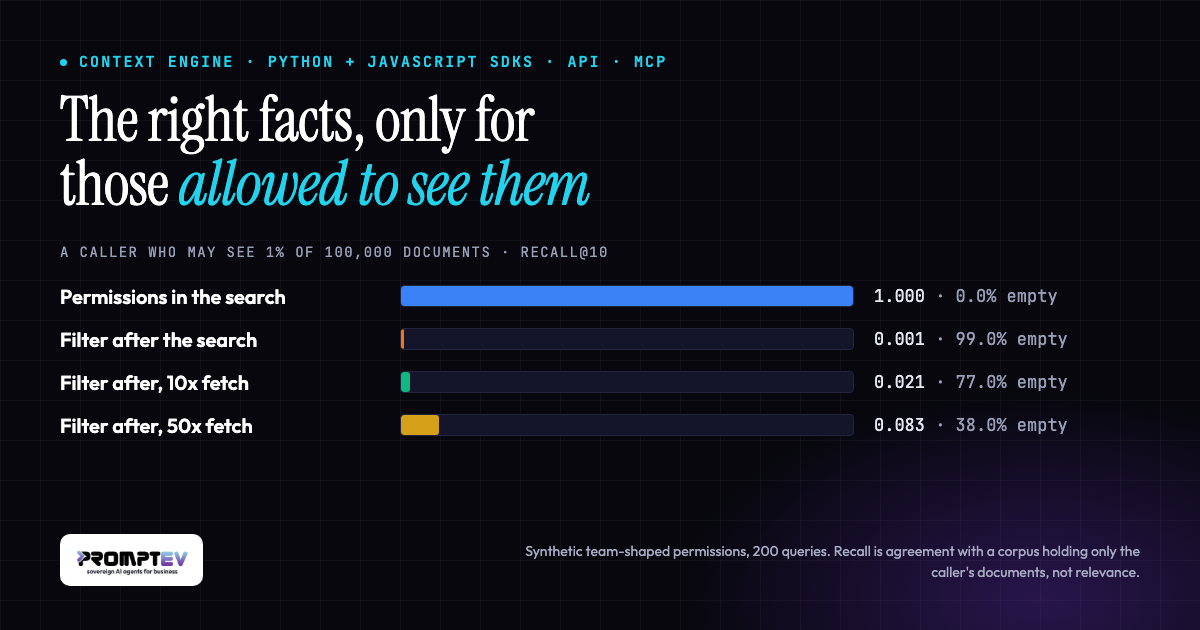
We measured what happens when a search ignores permissions and filters the results afterwards, which is a common way to add access control to search. The test used 100,000 public documents, 200 questions, and callers who may see only part of the collection.
| Caller may see | promptev: searches with full results | Filter afterwards: searches that came back empty |
|---|---|---|
| 10% of the documents | 200 of 200 | 63.5% |
| 1% of the documents | 200 of 200 | 99.0% |
With the Context Engine, a caller with narrow access got the same ten results as a collection holding only their own documents, on every one of the 200 questions. Filtering afterwards left the caller who sees 1% with nothing for 99 questions in 100, and nothing told them that results were missing. The permissions in this test were synthetic, and the figures measure retrieval only, not the quality of a generated answer.
Put documents in
Every call uses a project API key (it starts with fk_). You make one in the promptev console, under your project’s API keys. The key reads and writes only its own project.
Python (pip install promptev, Python 3.8 or newer):
from promptev import PromptevClient

client = PromptevClient(api_key="fk_...")

result = client.upload_document("handbook.pdf")
print(result.status, result.document_id, result.chunks)

# Up to 20 files at a time, 25 MB each. mode="graph" also records entities and relationships.
client.upload_documents(["contracts.pdf", "pricing.xlsx"], mode="graph")
JavaScript or TypeScript (npm install @promptev/client, anywhere with fetch):
import { PromptevClient } from "@promptev/client";

const client = new PromptevClient({ apiKey: "fk_..." });

const { results } = await client.uploadDocument([file]);
console.log(results);
In the app, you can also drop files into a project’s knowledge base, or connect a source and let it sync.
Search it
Python:
hits = client.search_knowledge_base("search", query="how many days do customers have to ask for a refund", top_k=5)["hits"]
for hit in hits:
    print(hit["document_name"], hit["score"])
    print(hit["chunk_text"])

# See what the knowledge base holds, then read one document in full.
client.search_knowledge_base("discover")
client.search_knowledge_base("get_doc", document_id=hits[0]["document_id"])
JavaScript or TypeScript:
const { hits } = await client.searchKnowledgeBase("search", {
  query: "how many days do customers have to ask for a refund",
  top_k: 5,
});
console.log(hits.map((hit) => `${hit.document_name}: ${hit.chunk_text}`));
Both SDKs have async forms and list every action the knowledge tool takes (KNOWLEDGE_ACTIONS). Besides discover, search and get_doc, there are actions to list documents, compute over spreadsheets, summarise across many documents, and follow relationships in the graph.
Over plain HTTP, the same two calls are POST https://api.promptev.ai/api/v1/documents (multipart, one files part per file) and POST https://api.promptev.ai/api/v1/knowledge with a JSON body such as {"action": "search", "query": "how many days do customers have to ask for a refund", "top_k": 5}. Send the key as Authorization: Bearer fk_....
The same tool everywhere
Every promptev project has its own MCP server. Its search_knowledge_base tool is the same tool, with the same actions, as the SDK and API calls above, and its upload_document tool adds files. So Claude, Cursor or any other MCP client can read your knowledge base with the same permissions and the same results as your own code. Inside promptev, agents use the knowledge base automatically.
Your database, your models
A workspace can keep its knowledge in its own database, and use its own embedding model, its own OCR and vision model for scanned documents and images, and its own model for extracting entities and relationships into the graph. These are settings in promptev. Your data stays in your own database, read with your own models, and the SDK, API and MCP calls above work the same way.
What it costs
promptev charges credits, and a credit costs $0.005. There are no seats.
- Putting documents in: 1 credit per page, slide or MB, with a minimum of 1 per file.
- A knowledge call: 1 credit, plus 1 for a search, or plus 5 when the search also looks through the graph.
- No extra charge for the API. A knowledge call from the SDKs or the API costs the same as from inside promptev.
- Your own database or models: the same rates as everyone else.
So a search costs 2 credits, which is one cent. A new workspace gets 1,000 free credits for a 30-day trial. See pricing for the rest.
Your own cloud
On the Enterprise plan, the whole promptev platform, the Context Engine included, can run in your own cloud or on premises under an annual licence. Your documents then never leave your environment.
Links
- Documentation: the Context Engine guide
- Product: the Context Engine
- Background: what is a context engine? and the Supabase extension trap
- Try it: promptev, with 1,000 free credits

Faisal Saeed is Founder & CEO of promptev, the platform for sovereign AI agents for business: agents that answer from company data, see only what each person may see, and ask before they act.